Introduction
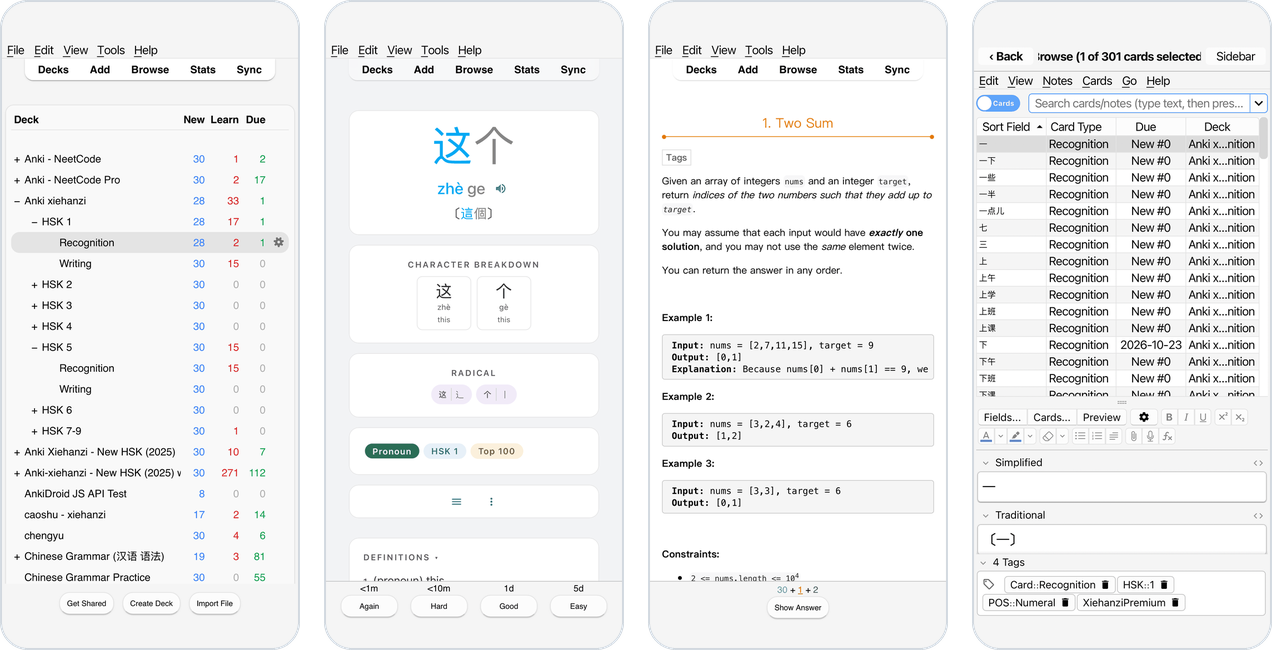
Kioku (記憶, “memory”) runs the unmodified Anki desktop app on iPhone, iPad and Android: the same deck list, reviewer, Browse, editors, statistics and desktop add-ons, made to work with a touch screen. It also runs in a browser tab, and on your own server for use from any browser (Which variant?).
On an iPhone:
This manual and Anki’s manual
Kioku is Anki desktop, so everything about studying, adding cards, deck options, searching, statistics, card templates and so on works exactly as described in the Anki Manual. This manual covers only what is different on a phone or in a browser:
- installing and updating Kioku, or running it on your server,
- how the app behaves on a phone: windows, the Back key, the keyboard, where your files are, add-ons,
- features only Kioku has: a sync server on the phone, sharing AnkiDroid’s media, using the phone’s Anki from a computer,
- what to do when something goes wrong.
| To learn about… | Read |
|---|---|
| Studying, answer buttons, learning steps | Anki: Studying |
| Adding and editing notes | Anki: Adding/Editing |
| Browse and searching | Anki: Browsing, Searching |
| Deck options, FSRS | Anki: Deck Options |
| Profiles | Anki: Profiles |
| AnkiWeb sync | Anki: Syncing |
| Importing and exporting | Anki: Importing, Exporting |
| Statistics | Anki: Statistics |
| Add-ons | Anki: Add-ons |
Kioku’s own questions and bug reports go to Kioku’s GitHub issues, not to Anki’s support: Ankitects doesn’t make Kioku.
“Anki” is a trademark of Ankitects. Kioku is an independent project, not affiliated with or endorsed by Ankitects.